

Why your Tesla charges at 8 amps on a 10-amp powerpoint, and how to fix it
At 8 amps a Tesla charges a fifth slower, about 11 km of range an hour instead of 13.5, and it can be fixed.


Key points
- Older second-generation (Gen 2) Mobile Connectors stay at 8 A until updated. Tesla's Gen 3 manual lists no such limit.
- If the car cannot talk to the adapter, Tesla says it cuts the current to 8 A.
- A saved lower setting can also hold it down. Check Charge Current first.
Tesla's own documents describe four reasons a Tesla draws 8 amps (A) instead of 10 from a normal 10-amp powerpoint. Check for a hot plug or an alert first, then the Charge Current setting.
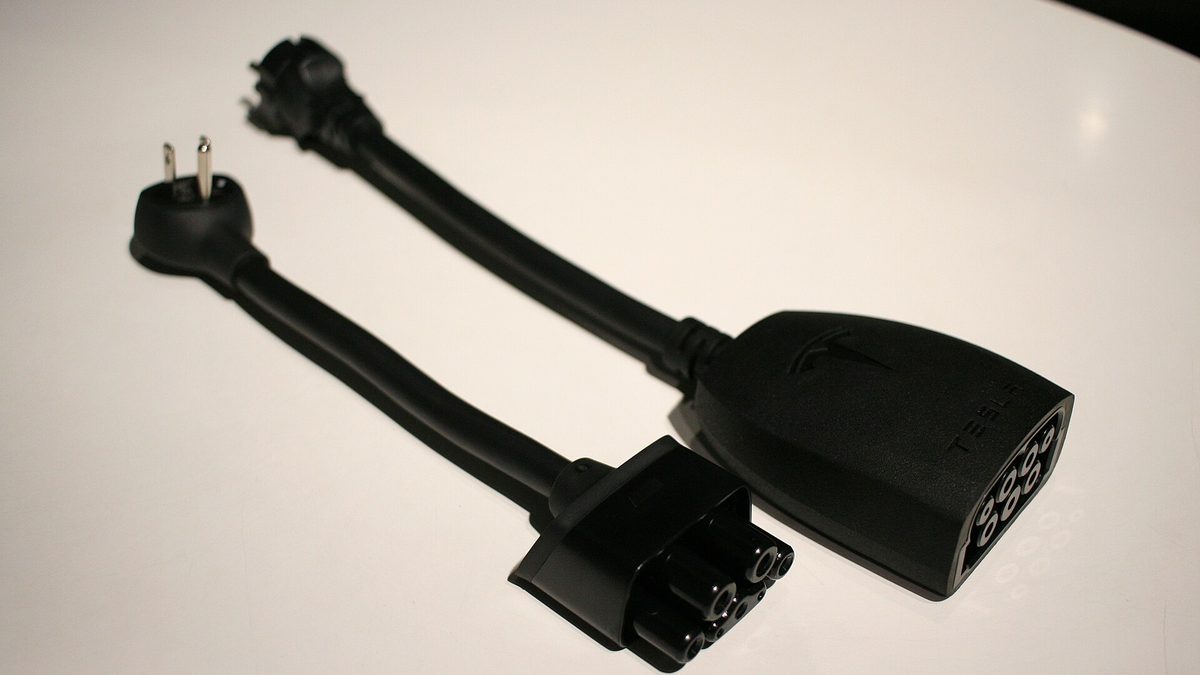
Tesla sells the third-generation Mobile Connector (Gen 3) with 10 A and 15 A adapters and a 6 m cable, on its online shop. Older leads are second generation (Gen 2).
Cause 1: an older Gen 2 lead
Tesla's Gen 2 manual has a footnote. The 10 A and 15 A capacities are available only after at least one full charging cycle and a firmware update from a car running software 2021.12.25 or later.
Until then, charging is limited to 8 A and 12 A. Owners on a Tesla Owners Club of Western Australia post say plug tails printed "10 8A" and "15 12A" do not update, while "10 10A" and "15 15A" do.
The Gen 3 manual has no such footnote, so skip this cause if you have the Gen 3 kit.
Cause 2: car and adapter not talking
In the Model Y owner's manual, alerts UMC_a013, a014 and a015 read: "Your Mobile Connector is unable to communicate with the wall plug adapter. Because your Mobile Connector cannot monitor the wall plug adapter temperature, charge current is automatically reduced to 8A."
Cause 3: a saved setting
The car may automatically pick a default charge current on a domestic outlet. You can override it by raising Charge Current for that location on the touchscreen or in the app.
The car also remembers a lowered current at each location, so if someone once turned it down at home, it stays down.
Cause 4: heat or voltage protection
Two more alerts in the Model Y manual reduce current on purpose. UMC_a017 reads "Charge rate reduced - Wall plug temperature high" and PCS_a053 reads "Charge rate reduced - Unexpected voltage drop". PCS_a054 stops the charge on a large voltage drop.
On the Gen 3 lead, green lights streaming with four red flashes means the wall plug is hot, and five red flashes means an adapter fault.
Tesla points to loose or worn outlets, building wiring and other large loads on the same circuit.
Both manuals say no extension cords, powerboards or conversion plugs. Use a properly earthed outlet in good condition, and mount the control box at least 46 cm above the floor in a garage.
What 8 A costs you in range
| Current | Wall power | To battery (x 0.85) | km added per hour | 10-hour night |
|---|---|---|---|---|
| 8 A | 1.84 kW | 1.56 kW | about 10.8 km | about 108 km |
| 10 A | 2.30 kW | 1.96 kW | about 13.5 km | about 135 km |
| 12 A | 2.76 kW | 2.35 kW | about 16.2 km | about 162 km |
| 15 A | 3.45 kW | 2.93 kW | about 20.2 km | about 202 km |
How we estimated this
km an hour = 230 V x amps x 0.85 / 1,000 kW, divided by 0.145 kWh a km. At 8 A: 230 x 8 x 0.85 / 1,000 = 1.56 kW, and 1.56 / 0.145 = about 10.8 km.
- 230 V is the voltage in Tesla's rate tables.
- 0.85 is our assumed efficiency, not a Tesla figure.
- 0.145 kWh a km is [CarsGuide's real-world Model Y L figure](https://www.carsguide.com.au/ev/tesla-model-y-l-long-term-part-1-102743) over 2,142 km. Highway driving, heat and cold use more.
The gap between 8 A and 10 A is about 2.7 km an hour, or 27 km over a ten-hour night.
A 15 A socket is not enough
Australian 15 A plugs have a wider earth pin, so they will not fit a 10 A socket. A 10 A plug does fit a 15 A socket, as this plug guide shows.
A 10 A adapter in a 15 A outlet still gives you 10 A. To get 15 A you need the 15 A adapter in a 15 A outlet on a suitable circuit, a job for a licensed electrician. Never modify plug pins.
The checklist
- Safety first: stop, unplug and call a licensed electrician if the plug, outlet or lead is hot, the rate keeps dropping, or the car shows UMC_a017, PCS_a053 or PCS_a054.
- Adapter alert? If the car shows UMC_a013, a014 or a015, reseat the adapter until it snaps in, follow Tesla's steps for that code and try the other adapter.
- On a Gen 2, read the plug tail: "10 10A" or "10 8A". Owners report a "10 8A" tail never updates, and a newer one is the fix.
- With steps 1 and 2 clear, set Charge Current to the maximum on the touchscreen or app. If a heat or voltage alert follows, go back to step 1.
- Still 8 A on a Gen 2 with a "10 10A" tail? Set the charge limit above the current level and let a session finish. Owners report that updates it.
- Never use an extension cord, powerboard or conversion plug, and never modify plug pins.
Rod Bland is the publisher and editor of Volts & Bots. He lives in Sydney and drives a Model Y L bought in Australia in 2026, with HW4 and FSD (Supervised). More about Rod Bland.